
Download CanIRank – SEO Keyword Tool for WordPress Sites
Overview
CanIRank is a purpose‑built SEO assistant for WordPress owners who want to boost their visibility without hiring a full‑time optimization specialist. Designed with small and medium‑sized businesses, independent bloggers, and niche‑site owners in mind, the platform blends keyword research, on‑page recommendations, and competitive analysis into a single, easy‑to‑navigate dashboard. By feeding the tool with a target keyword, CanIRank instantly evaluates the difficulty of ranking, suggests long‑tail variations, and even predicts the potential traffic uplift if the recommended actions are implemented. The software’s algorithm is constantly updated to reflect Google’s latest ranking signals, ensuring that the advice stays relevant as search engines evolve. While large enterprises with multi‑department SEO teams may opt for more enterprise‑grade solutions, CanIRank offers a cost‑effective, secure, and fast‑acting alternative that delivers measurable results for the majority of WordPress‑based sites.
Key Features That Set CanIRank Apart
- Keyword Difficulty Scoring: Real‑time calculation of ranking difficulty based on domain authority, backlink profile, and on‑page factors.
- Actionable Content Recommendations: Step‑by‑step guidance on how to improve existing pages or create new content that targets specific search intent.
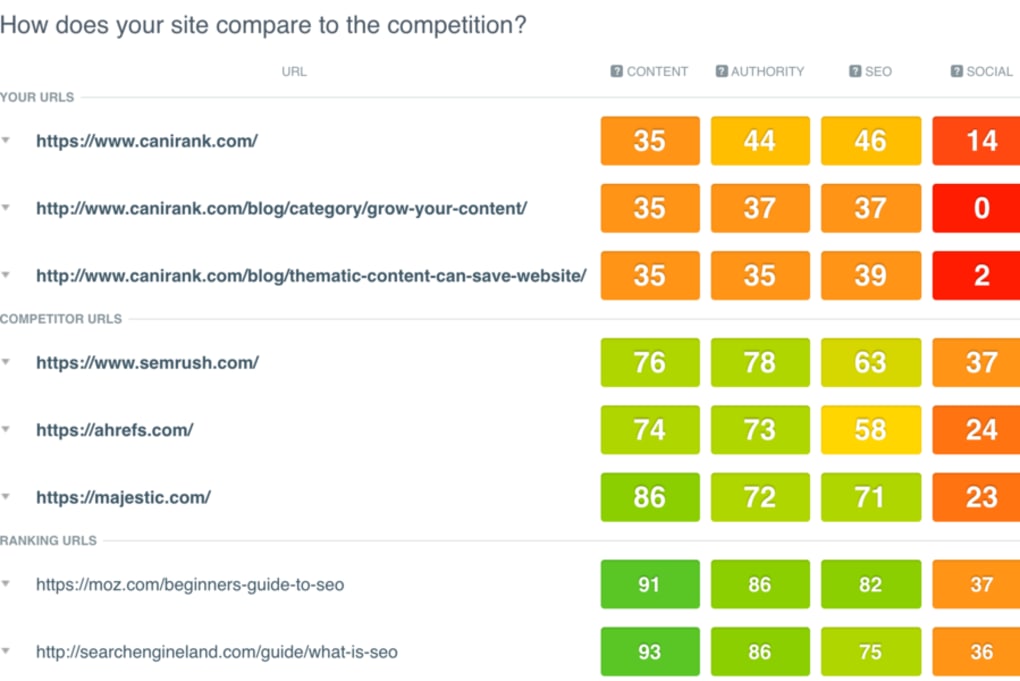
- Competitor Gap Analysis: Visual comparison of your site against top competitors, highlighting missed keyword opportunities.
- SEO Scorecard Dashboard: Consolidated view of your site’s health, including page speed, mobile friendliness, and internal linking.
- Integration with WordPress Plugins: One‑click import of recommendations into popular SEO plugins like Yoast and Rank Math.
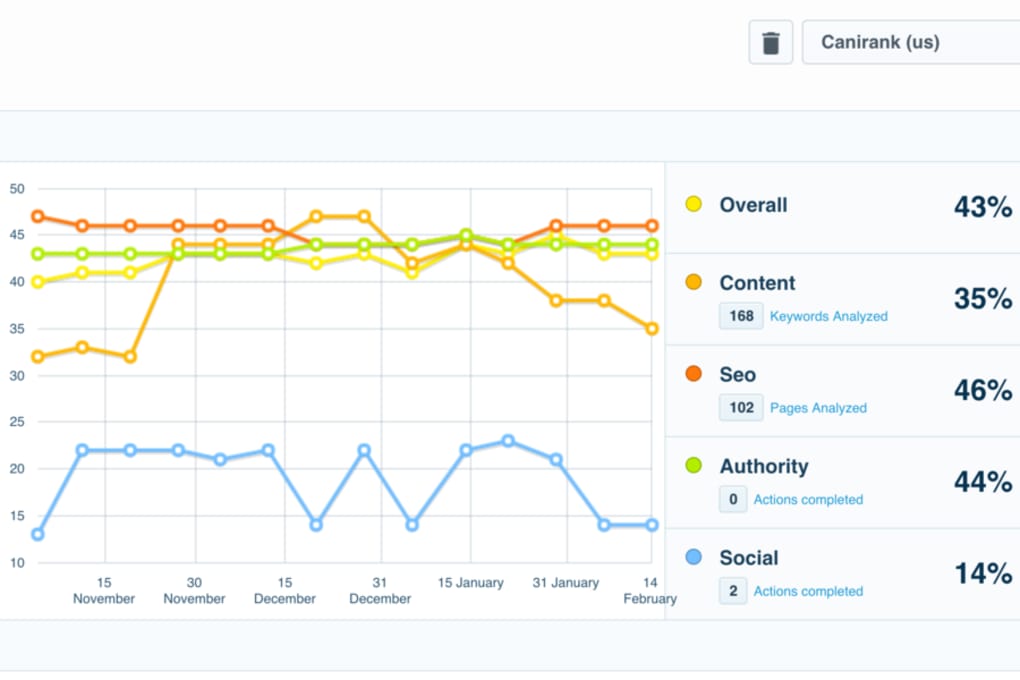
- Monthly Rank Forecasts: Predictive modeling that shows expected position changes after implementing suggested optimizations.
- Secure Cloud‑Based Architecture: All data is stored on encrypted servers, complying with GDPR and CCPA standards.
- Regular Updates & New Features: Monthly releases that add new keyword sources, AI‑driven content suggestions, and expanded reporting.
Installation & Usage – Getting Started in Minutes
Step 1: Create Your Account
Visit the official CanIRank website and click the “Start Free Trial” button. The registration form requires only a valid email address and a secure password. After confirming your email, you’ll be directed to the onboarding wizard.
Step 2: Connect Your WordPress Site
Within the dashboard, locate the “Integrations” tab. Choose “WordPress” and generate an API token. Install the official CanIRank plugin from the WordPress plugin repository, paste the token into the plugin settings, and authorize the connection. The plugin automatically scans your site’s existing content and feeds the data back to the cloud platform.
Step 3: Run Your First Keyword Scan
Enter a seed keyword that represents your core service or product. CanIRank will return a difficulty score, a list of related long‑tail terms, and a suggested content plan. Each recommendation includes a priority level (high, medium, low) and a brief explanation of why it matters for ranking.
Step 4: Implement Recommendations
Use the built‑in “One‑Click Optimize” button to push meta‑title, meta‑description, and header changes directly to WordPress. For deeper content edits, the platform provides a markdown editor where you can rewrite sections, add internal links, and insert suggested LSI keywords. Once changes are saved, the system re‑crawls the page and updates the SEO score in real time.
Step 5: Track Progress
The “Rank Forecast” tab displays a visual timeline of expected position improvements over the next 30‑90 days. You can also export weekly reports in PDF or CSV format for client presentations or internal reviews.
Compatibility, Pros & Cons
Supported Platforms: CanIRank is a web‑based SaaS solution, so it works on any modern operating system—Windows, macOS, Linux, as well as mobile browsers on Android and iOS. The optional WordPress plugin is compatible with WordPress 5.0 and later, and it supports PHP 7.4+.
Pros
- Tailored specifically for WordPress, reducing setup friction.
- Clear, actionable recommendations that even beginners can follow.
- Competitive gap analysis helps you outrank rivals without guessing.
- Secure, GDPR‑compliant cloud storage protects sensitive site data.
- Affordable pricing tiers make it accessible for freelancers and SMEs.
Cons
- Large enterprises may find the feature set too limited for multi‑domain strategies.
- Advanced backlink analysis is not as deep as dedicated link‑building tools.
- Some users report a learning curve when interpreting the rank‑forecast graphs.
- Only one language (English) is fully supported for the UI and help docs.
Frequently Asked Questions
Is CanIRank free to use?
CanIRank offers a 14‑day free trial with full access to all features. After the trial, you’ll need to choose a paid plan; there is no permanently free tier.
Can I use CanIRank with a non‑WordPress site?
Yes. Although the plugin integration is WordPress‑only, the core SaaS platform works with any website. You’ll just need to manually input URLs for analysis.
How often are the keyword difficulty scores updated?
Scores are refreshed daily using Google’s latest SERP data, ensuring that you always receive current difficulty estimates.
Does CanIRank provide backlink recommendations?
It includes basic backlink insights (e.g., number of referring domains) but does not generate outreach lists. For in‑depth link building, you may need a complementary tool.
Is my data safe on CanIRank’s servers?
All data is encrypted at rest and in transit. The service complies with GDPR, CCPA, and ISO‑27001 standards, offering a high level of security for your SEO data.
Conclusion & Call to Action
For WordPress owners seeking a streamlined, data‑driven way to improve rankings, CanIRank delivers exactly what the market needs: quick keyword difficulty insights, clear content recommendations, and a user‑friendly interface that doesn’t require a PhD in SEO. While large corporations might outgrow its feature set, the tool’s affordability, secure cloud architecture, and tight WordPress integration make it a top choice for SMEs and solo entrepreneurs. If you’re ready to transform your site’s visibility, click the button below to start your free trial and see how CanIRank can turn search queries into steady traffic.
Start Your Free Trial of CanIRank Today


.png)



